

Option 1: Managing Webhooks via Dashboard
You can easily configure webhook triggers through the CometChat dashboard.Steps to Configure:
- Log in to the CometChat Dashboard and select your app.
- Navigate to Settings > Webhooks in the left-hand menu.
- Click Add Webhook to create a new webhook.
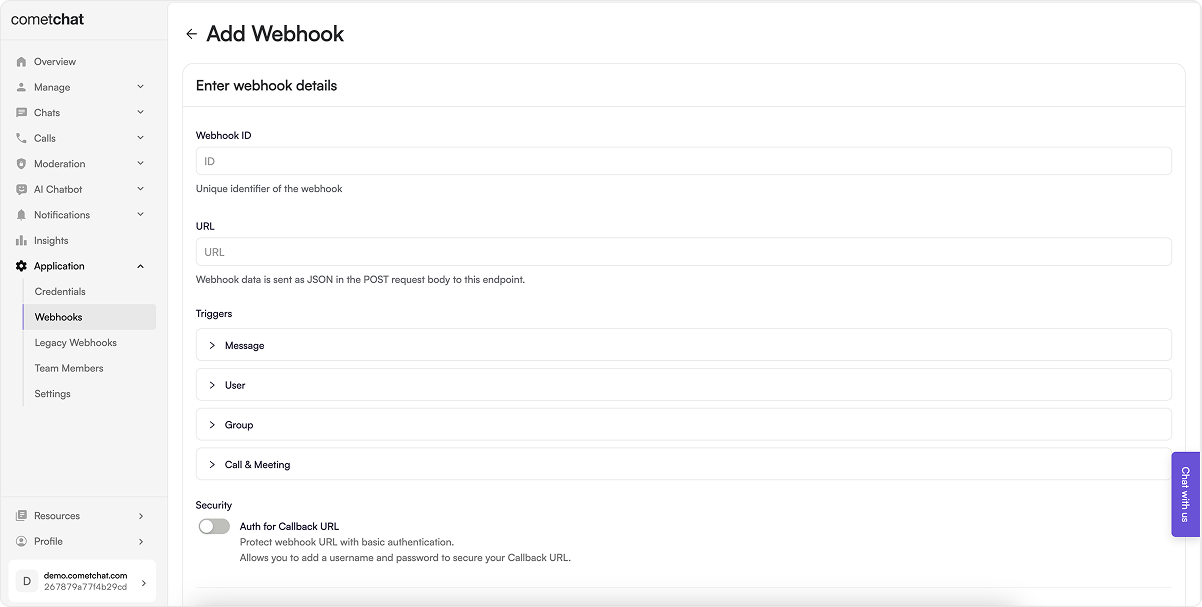
-
Provide the following details:
- Webhook ID – A unique identifier.
- URL – Your server endpoint where event payloads will be sent.
- Triggers – Enable events you wish to listen to.
- Security – Enable authentication for enhanced security.
- Enable the webhook.
- Click Save to apply your configuration.
Option 2: Managing Webhooks via Management APIs
If you prefer automation or need to manage webhooks programmatically, you can use our REST APIs.Webhook Operations
Trigger Operations
Choose the method that best fits your use case—Dashboard for quick setup, or APIs for advanced and automated configurations.